


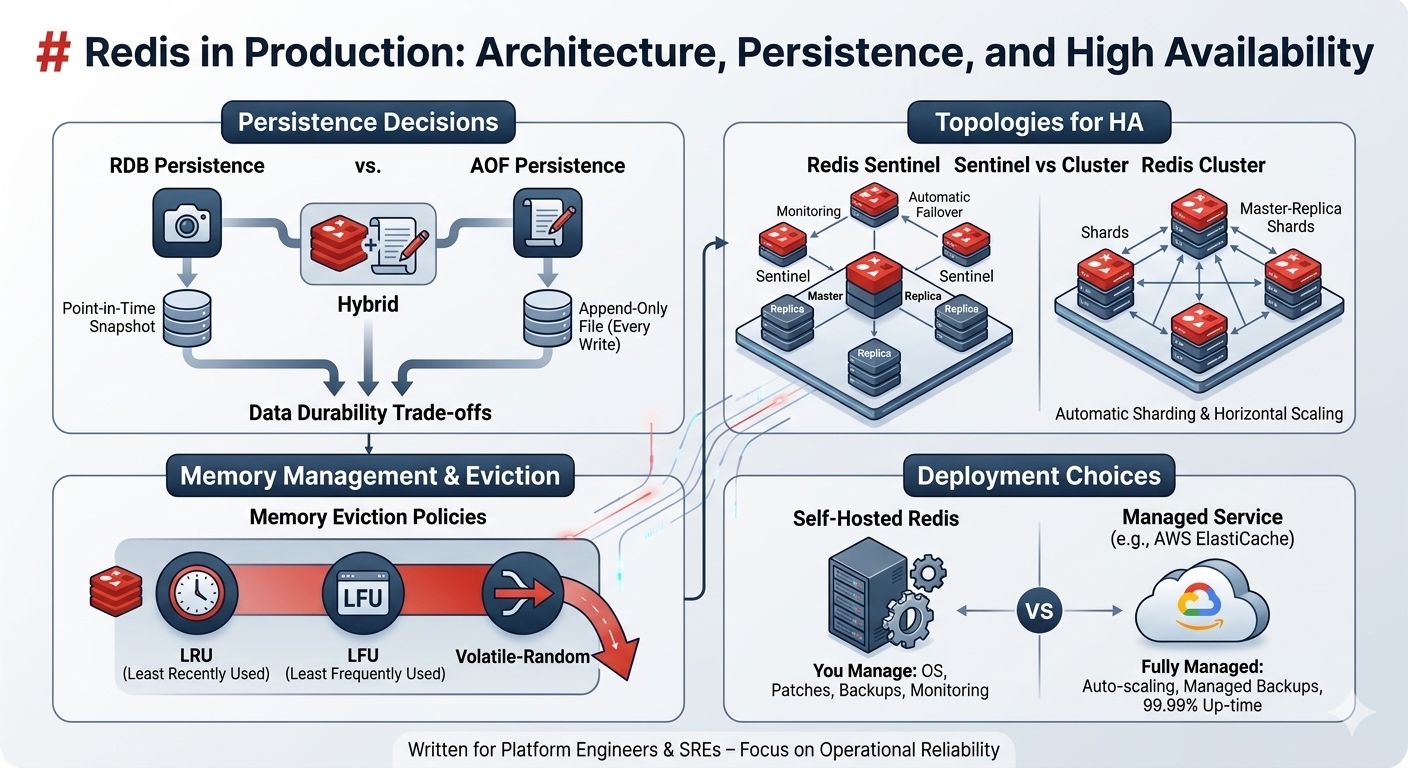
TL;DR: Redis is simple to start but tricky to run correctly at scale. This guide covers the production deployment decisions that matter: RDB vs AOF vs hybrid persistence, Sentinel vs Cluster topologies, memory eviction policies that won’t kill your app, and the self-hosted vs ElastiCache trade-off. Written for platform engineers who need Redis to stay up, not developers learning
SETandGET.
Prerequisites
You should understand what Redis is and have used it in development (commands like SET, GET, EXPIRE). Basic familiarity with master-replica replication concepts and Linux process management will help. You don’t need distributed systems expertise or deep knowledge of memory management internals.
The Problem: Redis Looks Simple Until It Isn’t
Your team added Redis to cache API responses. It worked beautifully in development, with instant response times, clean key-value operations, and everything was fast. You deployed it to staging with a single Redis instance. Still fine.
Then production happened. Traffic spiked. The instance ran out of memory and started refusing writes. Your monitoring lit up with errors. Restarts helped temporarily, but the instance filled up again within hours. You added replicas for read scaling, but the master failed during a deployment and didn’t automatically fail over. Thirty seconds of downtime turned into five minutes while you manually promoted a replica.
The issue isn’t Redis; it’s that the defaults are designed for development, not production. A single instance with no persistence and no failover config will fail you eventually. But the right combination of persistence mode, replication topology, eviction policy, and monitoring turns Redis into a reliable production data store.
Background: What Redis Actually Does
Redis is an in-memory data structure store. Everything lives in RAM, which is why it’s fast, no disk seeks, no buffer pool management. But RAM is volatile. A power loss results in data loss unless you configure persistence.
Redis is single-threaded for command execution (it uses I/O multiplexing for network handling). This means one CPU core processes all commands sequentially. No race conditions, no locking overhead. But also, one slow command blocks everything else. (Redis latency docs)
Data structures beyond strings: Redis supports lists, sets, sorted sets, hashes, bitmaps, HyperLogLogs, streams, and geospatial indexes. This makes it more than a cache; it’s a data structure server.
Replication is asynchronous by default: a master accepts writes and propagates changes to replicas after acknowledging the client. If the master crashes before replicating, those writes are lost. (Redis replication docs)
Persistence: RDB, AOF, and Hybrid Mode
Redis offers three persistence modes. Pick the wrong one, and you either lose data or kill your disk I/O.
RDB: Point-in-Time Snapshots
RDB creates periodic snapshots of the entire dataset and writes them to disk. Think of it as a database backup taken every N minutes.
How it works: Redis forks a child process via fork(), which writes the snapshot while the parent continues serving requests. The snapshot is atomic; it reflects the state at fork time.
The catch: forking briefly requires enough free memory to duplicate the parent’s memory pages (copy-on-write). On a heavily written dataset, this can temporarily double your memory usage. On a 10GB instance with high write throughput, you might need 15GB of actual RAM available during the snapshot. (Redis persistence docs)
Configuration:
save 900 1       # Snapshot if ≥1 key changed in 900 seconds
save 300 10      # Snapshot if ≥10 keys changed in 300 seconds
save 60 10000    # Snapshot if ≥10,000 keys changed in 60 seconds
When to use RDB: datasets where losing the last few minutes of writes is acceptable. Session stores, leaderboards, analytics aggregates. It loads faster on restart than AOF and produces smaller files.
When to avoid RDB: any use case requiring strong durability (transactions, job queues, inventory counts).
AOF: Append-Only File
AOF logs every write command to disk before returning success. On restart, Redis replays the log to rebuild the state.
Fsync policies:
appendfsync always– sync after every write (slow but durable)appendfsync everysec– sync once per second (default; up to 1 second of data loss)appendfsync no– let the OS decide (fastest but riskiest)
appendonly yes
appendfsync everysec
AOF files grow indefinitely unless rewritten. Redis can automatically rewrite the AOF in the background when it exceeds a size threshold; this compacts it by replaying the log into a new snapshot-style file.
When to use AOF: any workload where data loss is unacceptable. Job queues, rate limiters, real-time counters. Pair it with everysec fsync for a good balance between durability and performance.
When to avoid AOF: high-throughput write workloads on slow disks. AOF rewrites can cause latency spikes.
Hybrid Mode (RDB + AOF)
Redis 4.0+ supports hybrid persistence: RDB snapshots for fast restarts, AOF for durability.
aof-use-rdb-preamble yes
On restart, Redis loads the RDB snapshot first, then replays any AOF changes since the last snapshot. Best of both: fast recovery and minimal data loss.
When to use hybrid: production deployments where you want durability but can’t afford 10-minute restart times, replaying a massive AOF.
| Mode | Durability | Restart Speed | Disk I/O | Memory Overhead |
|---|---|---|---|---|
| RDB only | Low (minutes of loss) | Fast | Low (periodic) | High (fork doubles RAM) |
| AOF only | High (≤1 sec loss) | Slow (replay) | High (every write) | Medium (rewrite fork) |
| Hybrid | High (≤1 sec loss) | Fast | Medium | Medium |
Replication Topologies: Sentinel vs Cluster
Redis supports two high-availability patterns. Choose based on your dataset size and failover requirements.
Redis Sentinel: Automatic Failover for Master-Replica
Sentinel monitors a master and one or more replicas. If the master fails, Sentinel runs an election, promotes a replica, and notifies clients.
Architecture: run 3+ Sentinel processes (odd number for quorum). They communicate via gossip protocol and vote to promote a new master when the current one is unreachable.
# Sentinel config
sentinel monitor mymaster redis-master.internal 6379 2  # 2 = quorum size
sentinel down-after-milliseconds mymaster 5000
sentinel failover-timeout mymaster 10000
Failover time: typically 30–60 seconds from failure detection to new master promotion. Clients using Sentinel-aware libraries (Jedis, ioredis) automatically reconnect to the new master.
When to use Sentinel: a single dataset that fits on one instance, but you need automatic failover. E-commerce carts, user sessions, leaderboards.
Limitations: no horizontal scaling, all data lives on the master. Reads can scale via replicas, but writes are bottlenecked on one node.
Redis Cluster: Horizontal Sharding + Built-In Failover
Cluster shards data across multiple master nodes using hash slots. Redis Cluster has 16,384 hash slots; each key hashes to a slot, and each master owns a range of slots. (Redis Cluster spec)
Example: 3 masters, each with 1 replica:
- Master A: slots 0–5460
- Master B: slots 5461–10922
- Master C: slots 10923–16383
If Master A fails, its replica automatically promotes itself. No Sentinel needed, Cluster nodes handle failure detection and failover internally.
When to use Cluster: datasets > 100GB, high write throughput (sharding distributes writes), or you need true horizontal scaling.
When to avoid Cluster: multi-key operations (MGET, MSET, transactions) Across different hash slots doesn’t work. If your app relies on multi-key atomicity, Cluster will break it unless all related keys share the same hash tag ({user:123}:cart, {user:123}:profile – both hash to the same slot.
Managed: AWS ElastiCache for Redis
ElastiCache handles replication, backups, patching, and Multi-AZ failover automatically. You pick cluster mode (enabled = sharding, disabled = Sentinel-style).
Failover time: ~35 seconds for Multi-AZ with automatic failover. (AWS ElastiCache docs)
Trade-offs:
- Pro: zero operational overhead, automated backups, managed patching
- Con: higher cost (2–3× vs self-hosted on EC2), limited tunability (can’t change some config parameters)
When to use ElastiCache: you don’t have dedicated ops capacity, or uptime SLA matters more than cost.
When to self-host: you need full control (custom modules, specific config), or cost at scale is a concern (100+ GB datasets).
Memory Eviction Policies: What Happens When RAM Fills Up
Redis is in-memory. If you don’t set a maxmemory With a limit and an eviction policy, the instance will consume all available RAM, and the OS will kill it.
Configuration:
maxmemory 2gb
maxmemory-policy allkeys-lru
Eviction policies (Redis eviction docs):
| Policy | Behavior | Use Case |
|---|---|---|
noeviction | Evict the least recently used keys | Evict the least frequently used keys |
allkeys-lru | Evict the least frequently used keys | Pure cache (no TTL-based expiry) |
allkeys-lfu | Evict least frequently used keys | Cache with access-frequency skew |
volatile-lru | Evict LRU among keys with TTL | Mixed workload (cache + persistent keys) |
volatile-lfu | Evict LFU among keys with TTL | Mixed workload with frequency skew |
volatile-ttl | Evict keys closest to expiration | Temporary data with explicit expiry |
volatile-random | Evict random keys with TTL | No preference, just make space |
Production recommendation: if Redis is purely a cache, use allkeys-lru. If it’s mixed (cache + job queues + counters), use volatile-lru and make sure cache keys have TTLs.
Do not use noeviction in production. It will cause write failures when memory is full.
Trade-offs and When NOT to Use Redis
Redis is not a silver bullet. Here’s when to pick something else.
Don’t use Redis as your primary database: it’s not designed for complex queries, joins, or transactional integrity across multiple keys (except in limited cases with Lua scripts or transactions). Use PostgreSQL, MySQL, or DynamoDB for primary storage.
Don’t use Redis for analytics at scale: if you’re aggregating billions of rows, use ClickHouse or BigQuery. Redis is for fast access to small, hot datasets, not batch processing.
Don’t use Cluster if you need multi-key atomicity: Cluster shards data, so MGET and transactions only work within a single hash slot. If your app requires atomic operations across arbitrary keys, use Sentinel or a single instance.
Don’t use Redis for durable message queues without careful design: Redis Streams is good for event sourcing and log-style queues, but default replication is async; a master crash before replication loses messages. If you need guaranteed delivery, pair it with the WAIT command (synchronous replication) or use RabbitMQ / Kafka instead.
Self-hosting Redis Cluster is operationally expensive: resharding, monitoring, and failure recovery require expertise. If your team is < 5 people, ElastiCache or MemoryDB is probably the better path.
Key Takeaways
- Choose persistence based on acceptable data loss: RDB for minutes, AOF for seconds, hybrid for best of both.
- Sentinel is for automatic failover on a single master. Cluster is for horizontal scaling across masters.
- Set
maxmemoryand an eviction policy (allkeys-lrufor pure cache,volatile-lrufor mixed workloads) Or your instance will crash. - Redis replication is async by default; a master crash can lose recent writes unless you use
WAITsynchronous replication. - ElastiCache costs 2–3× more than self-hosted EC2 but eliminates operational overhead. Worth it for most teams.
- Don’t use Redis as a primary database or for workloads requiring complex queries and joins.
- The Valkey fork (March 2024) offers a license-free path forward for teams concerned about Redis’s dual-license model.
Auto Amazon Links: No products found.