


TL;DR: Most production “AI agents” are actually deterministic workflows — and that’s fine, but the architecture decision you make right now determines whether your system costs $0.10 or $50 per request, whether it completes in 3 seconds or 3 minutes, and whether you can debug it when it fails at 2am. This post maps Anthropic’s five canonical patterns against AWS Bedrock AgentCore, Google ADK, and Azure Foundry Agent Service, and surfaces the five production failure modes that quietly kill agent projects after the demo.
Audience: architect
Reading Time: ~16 min (~3,300 words)
Prerequisites
You should understand:
- What LLMs are and how tool calling/function calling works
- The basics of serverless compute and event-driven architectures on at least one cloud
- Why context windows matter for LLM-based systems
You do not need to have built an agent system before — this post is specifically for engineers evaluating whether and how to build one.
The Problem: The Vocabulary Gap That Causes Production Failures
Two things reliably happen when teams ship their first AI agent to production.
In week one, it works surprisingly well on the demo scenarios. In week six, it has cost 40× more than budgeted, failed silently on three edge cases, introduced a latency spike that the team cannot trace, and the on-call engineer has no idea how to reproduce the failure.
The root cause is rarely the model. It is almost always an architecture mismatch caused by a vocabulary problem: the word “agent” is applied to everything from a simple LLM wrapper to a fully autonomous multi-agent orchestration system. The architecture decisions that follow — which pattern to use, what guardrails to add, how to instrument the system — are profoundly different depending on which of those you actually built.
Anthropic’s December 2024 paper “Building Effective Agents” introduced the most useful distinction in the field:
- Workflows: systems where LLMs are components in predefined code paths. The execution sequence is fixed by the developer.
- Agents: systems where LLMs dynamically direct their own process, including deciding which tools to call and in what order.
The practical implication: most production systems labeled “agents” are workflows. That is not a criticism — workflows are more predictable, cheaper to run, and far easier to debug. But if you architect a workflow using an agentic framework with autonomous loop control, you get the cost and complexity of agents without the flexibility benefit.
This post gives you the map to make that call correctly.
Background: The Five Patterns
Anthropic’s paper identifies five core patterns that cover the vast majority of LLM-based systems. Understanding these is a prerequisite to everything that follows:
1. Prompt Chaining — The output of one LLM call becomes the input of the next. Steps are sequential and fixed. Example: classify intent → extract entities → generate response.
2. Routing — A classifier decides which specialized subpipeline handles the input. Example: customer query → classify as billing/technical/escalate → route to appropriate handler.
3. Parallelization — Multiple LLM calls run concurrently on independent subtasks. Includes the “sectioning” variant (divide a document, process each section independently) and the “voting” variant (run the same prompt N times, take a majority or best result).
4. Orchestrator-Workers — An orchestrator LLM dynamically decomposes a task and delegates subtasks to specialized worker agents. Workers call tools; the orchestrator synthesizes results. This is the first “true agent” pattern — the execution path is not fixed in advance.
5. Evaluator-Optimizer — A generator LLM produces output, an evaluator LLM scores it, and the system iterates until a quality threshold is met (or a max iteration cap is hit). The evaluator is the critical component that people forget to build before this pattern reaches production.
Patterns 1–3 are mostly workflows — deterministic execution paths that happen to include LLM calls. Patterns 4–5 are agentic — the LLM controls branching and iteration. Your architecture, cost model, observability requirements, and failure modes differ fundamentally between the two groups.
Choosing the Right Pattern
Before selecting a cloud platform, pick the right pattern. The flowchart below maps task characteristics to the appropriate pattern. Use the least complex pattern that can complete the task.
Diagram
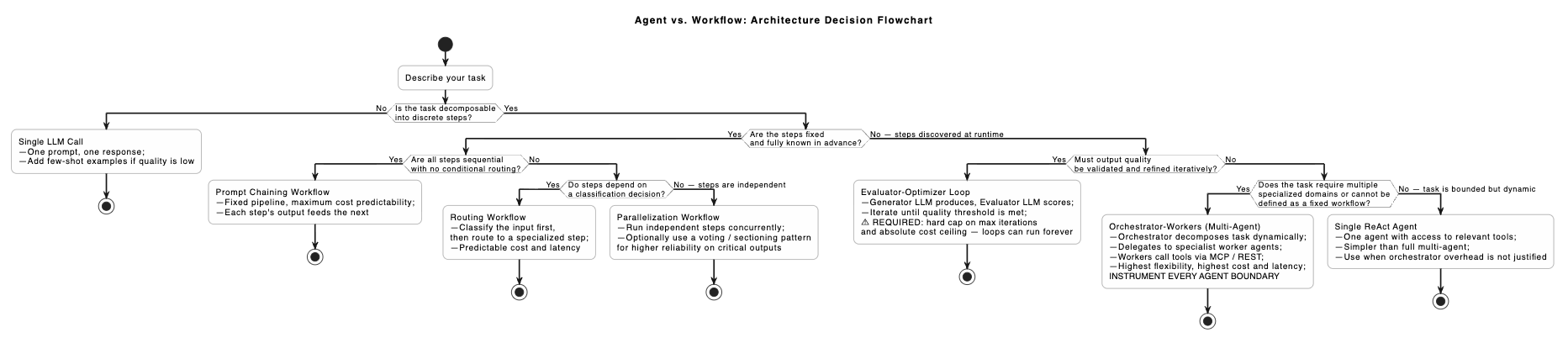
Pattern Selection Summary
| Pattern | Dynamic control flow | Cost predictability | P99 latency | Debugging complexity | Best fit |
|---|---|---|---|---|---|
| Prompt chaining | No | Very high | Low (1–5s) | Very low | Document processing, deterministic transformation pipelines |
| Routing | Partial | High | Low (1–5s) | Low | Intent classification, tiered support, rule-based dispatch |
| Parallelization | No | High | Low (parallel steps) | Medium | Independent operations, consensus/voting on critical outputs |
| Orchestrator-workers | Yes | Low | High (15–60s+) | High | Open-ended research, multi-domain tasks, unknown subtask count |
| Evaluator-optimizer | Yes (iteration) | Medium (bounded) | High | Medium | Code generation, long-form content, quality-critical outputs |
The key architectural insight from this table is that cost predictability and latency are inversely correlated with task flexibility. You cannot have all three — pick two.
Three Platform Approaches
All three major cloud providers now offer production-grade infrastructure for agent systems. The right platform depends less on capability gaps (which have narrowed substantially) and more on your existing cloud footprint, compliance requirements, and whether you need framework-agnostic portability.
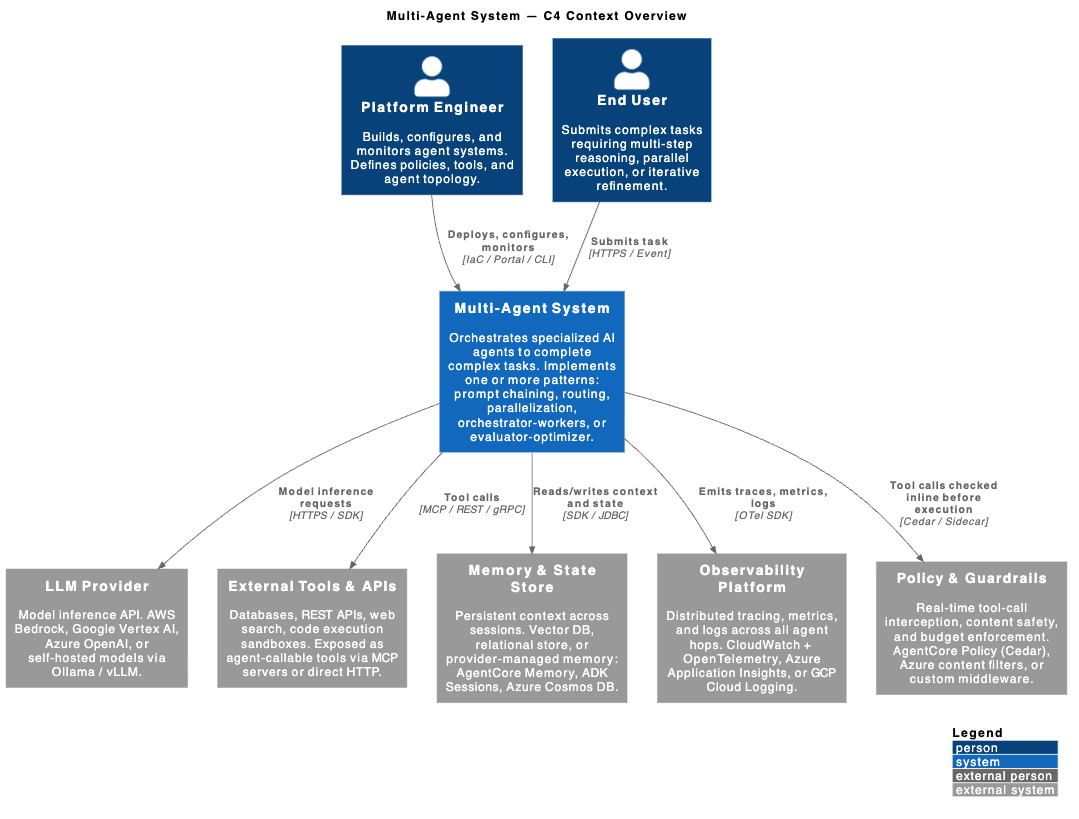
Context Diagram
AWS Bedrock AgentCore
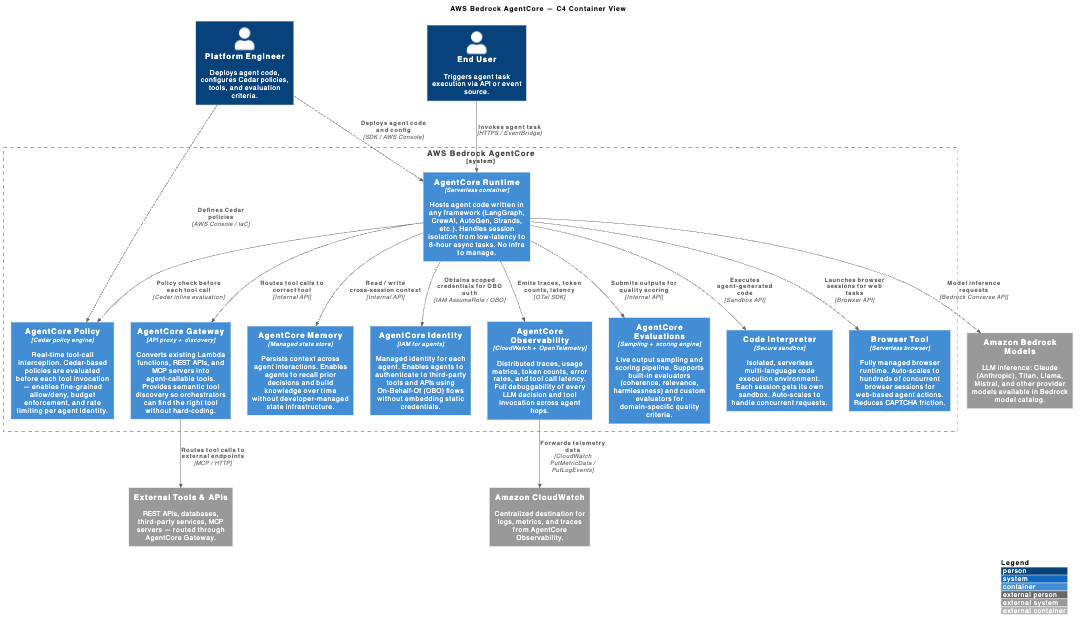
Bedrock AgentCore — currently GA — is AWS’s take on “the agent runtime that gets out of your way.” The key design decision: framework-agnostic by default. You bring your LangGraph, CrewAI, AutoGen, or custom framework code; AgentCore provides nine fully managed services around it.
The nine components are split into two groups:
Infrastructure services: Runtime (serverless hosting, session isolation, 8-hour async support), Gateway (converts Lambda/REST/MCP servers into agent-callable tools with semantic discovery), Memory (cross-session context persistence), Identity (managed IAM for agents, On-Behalf-Of authentication to third-party tools).
Quality and safety services: Policy (Cedar-based real-time tool-call interception before execution), Evaluations (live output sampling and scoring with built-in and custom evaluators), Observability (CloudWatch + OpenTelemetry across every agent hop), Code Interpreter (isolated multi-language sandbox), Browser (serverless browser runtime scaling to hundreds of concurrent sessions).
The Cedar policy engine deserves emphasis. Cedar policies are evaluated before each tool call executes — not just at input/output boundaries. This is what makes production guardrails possible: you can reject a tool call that would write to a database outside business hours or exceed a per-agent cost budget, without modifying your agent code.
Container Diagram
Google ADK + Agent Engine
Google’s Agent Development Kit (ADK) is open-source (Apache 2.0) and production-ready in Python, TypeScript, Go 1.0, and Java 1.0. Unlike AgentCore (a runtime platform you deploy code onto), ADK is a framework you code against, deployed via Agent Engine on Vertex AI, Cloud Run, or GKE.
ADK’s differentiated capabilities:
- Native multi-agent: First-class support for orchestrator-workers architectures, sequential and parallel workflow agents, and loop agents — built into the framework SDK.
- A2A protocol: ADK supports the Agent-to-Agent (A2A) communication protocol, enabling standardized inter-agent communication at the API level. This is the foundation for multi-vendor agent interoperability — still emerging, but worth watching.
- MCP native: ADK has a dedicated
/mcp/module for MCP server integration, making tool definitions portable across any MCP-compliant host. - Evaluation framework: Built in, not bolted on. ADK’s evaluation tooling is a first-class SDK component with visual debugging.
- Model agnostic: Gemini, Claude, Gemma, Vertex AI hosted models, Ollama, vLLM, LiteLLM — same ADK code, swappable model configuration.
If you are already on GCP or if open-source portability is a hard requirement, ADK is the strongest option. The trade-off against AgentCore: you own more infrastructure (the Agent Engine handles the runtime, but the framework itself is yours to upgrade and maintain).
Azure Foundry Agent Service
Microsoft Foundry Agent Service (last updated April 16, 2026) takes a different positioning than the other two: three tiers based on how much control you need.
Prompt agents (GA): configuration-only, no code required. Define instructions, model, and tools in the portal. Agent Service handles hosting and orchestration. Best for rapid prototyping and internal tools.
Workflow agents (preview): YAML-based or visual builder orchestration of multiple agents. Supports branching logic, human-in-the-loop steps, and group-chat patterns. For teams that want multi-agent without writing orchestration code.
Hosted agents (preview): Bring your own framework (LangGraph or custom), deploy as a container on the Agent Service infrastructure; Foundry manages runtime and scaling. This is the equivalent of AgentCore Runtime.
Microsoft’s enterprise integrations are the real differentiator. Published agents can be distributed directly through Microsoft Teams and Microsoft 365 Copilot — agents become available where enterprise users already work, without building a custom UI. The Entra Agent Registry provides identity-based agent discovery comparable to AWS’s semantic tool discovery in AgentCore Gateway.
Platform Comparison
| Capability | AWS Bedrock AgentCore | Google ADK + Agent Engine | Azure Foundry Agent Service |
|---|---|---|---|
| GA status | GA (all tiers) | Production-ready (Python/TS/Go/Java 1.0) | Prompt agents: GA; Workflow/Hosted: Preview |
| Approach | Runtime platform (framework-agnostic) | Framework (Apache 2.0 open source) | Tiered service: no-code → code-based |
| Multi-agent coordination | Via supported frameworks in Runtime | Native multi-agent in ADK SDK | Workflow agents (YAML/visual) + Hosted |
| MCP support | AgentCore Gateway (connect to MCP servers) | Native MCP module in ADK | MCP servers via Azure Functions + catalog |
| A2A protocol | Framework-dependent | Native A2A protocol in ADK SDK | Entra Agent Registry (distribution layer) |
| Policy enforcement | Cedar-based, per-tool-call inline | Evaluation framework + Apigee AI Gateway | Content safety filters, XPIA protection, Azure RBAC |
| Identity model | AgentCore Identity (IAM, OBO auth) | GCP service accounts, Vertex AI IAM | Microsoft Entra per-agent identity, OBO passthrough |
| Observability | CloudWatch + OpenTelemetry native | ADK logging + evaluation + Cloud Trace | Application Insights, end-to-end agent tracing |
| Pricing model | Per-use, serverless (agentcore.aws) | Vertex AI consumption-based | Consumption-based (Azure AI Foundry pricing) |
| Key differentiator | Cedar policies, framework-agnostic, 9 managed services | A2A protocol, open source portability, multi-language | M365/Teams distribution, Entra identity, enterprise compliance |
Production Failure Modes
This is the section you will not find in the vendor documentation. These are the five patterns that reliably cause production agent failures after a successful demo.
Failure 1: Compounding Error Amplification
If you chain five agents, each with 90% task accuracy, the end-to-end system accuracy is at most 0.9⁵ = 59%. This is not a theoretical problem — it is arithmetic. In practice, accuracy is harder to define and is often lower.
What this looks like in production: An orchestrator-workers pipeline succeeds in 95% of test cases. After launch, you observe the real distribution of inputs, and the accuracy is 60%. Each individual agent looks fine in isolation. The problem is the chain.
Mitigation: Measure each agent’s accuracy independently on the real task distribution before chaining. Use an explicit evaluator pattern (see Pattern 5 above) between high-stakes handoffs in the chain, not just at the output boundary.
Failure 2: Unbounded Cost from Feedback Loops
An evaluator-optimizer with a weak or poorly calibrated evaluator will loop indefinitely, or until your cloud budget is exhausted. There is no natural stopping condition in the majority of open-source agent frameworks.
What this looks like in production: An overnight batch job for content generation runs all night, loops 40 iterations on one document because the evaluator’s quality bar is set to a score of 0.95 on outputs that only ever reach 0.88, and hits a $3,000 bill by morning.
Mitigation: Every evaluator-optimizer loop must have a hard iteration cap (e.g., max 3 loops), a time ceiling, and a cost ceiling. All three. AgentCore Policy (Cedar rules) and Azure Foundry’s tool configuration can enforce budget limits per agent session without modifying agent code.
Failure 3: Latency Accumulation in Sequential Chains
Each LLM call in a sequential chain adds latency. An orchestrator that delegates to four workers, where each worker makes three LLM calls, produces a minimum end-to-end latency of 12 LLM inference round-trips — often 30–90 seconds with frontier models.
What this looks like in production: An agent assistant that works well in a Slack slash command context suddenly feels broken when embedded in a UI where users expect sub-5-second responses.
Mitigation: Identify independent sub-tasks and parallelize them (Pattern 3). Use smaller, faster models for intermediate steps where quality requirements are lower. Set explicit latency budgets before designing agent topology — work backward from an acceptable user-facing latency to determine how many sequential LLM hops you can afford.
Failure 4: Debugging Opacity
Tracing a failure through four agents, each making eight tool calls, across distributed log streams is extremely difficult without purpose-built instrumentation. Standard application logging is insufficient — you need to reconstruct the exact sequence of LLM decisions, tool calls, inputs, and outputs that led to the failure.
What this looks like in production: An agent produces an incorrect output. The engineer opens CloudWatch or Application Insights, finds 47 log lines from four agents, has no way to correlate them to a single user request, and cannot reproduce the issue because the agent’s internal state was not persisted.
Mitigation: Before shipping to production, verify that every agent boundary is instrumented with OpenTelemetry traces, including: request ID propagation across all hops, every tool call with its exact input and output, every LLM model, token count, and latency, and the full conversation context at each handoff. All three platforms provide this when configured correctly — AgentCore Observability (CloudWatch + OTel), ADK’s logging module, and Azure’s Application Insights agent tracing.
Persist conversation context to the memory layer (AgentCore Memory, ADK Sessions, Azure Cosmos DB) on every run, not just on success. You cannot debug failures you cannot reconstruct.
Failure 5: Tool Call Storms from Insufficiently Scoped Permissions
An orchestrator agent with access to 50+ tools and no constraints will pattern-match to over-call. A three-step research task results in 28 tool calls as the LLM speculatively tries tools to satisfy ambiguous instructions.
What this looks like in production: Your agent’s per-request cost is 40× higher in production than in testing because test cases were well-specified, but production inputs are ambiguous, and the model tries more tools when uncertain.
Mitigation: Scope each agent’s tool permissions to the minimum required for its role. Workers should not have access to orchestrator-level tools. Use Cedar policies (AgentCore) or Foundry’s tool configuration scope to enforce this at the platform level, not just in your system prompt. Write explicit tool descriptions that specify when not to use a tool — poor tool definitions are the primary cause of tool call storms.
Real-World Example: Ericsson on AWS AgentCore
Ericsson — which manages telecommunications infrastructure for billions of users globally — has deployed agent systems on AWS Bedrock AgentCore, with Dag Lindbo (SVP Cloud Software & Services) specifically citing the framework flexibility as the key production consideration: the ability to bring existing agent code without rewriting it for a proprietary runtime (AWS AgentCore product page).
This is the pattern you will encounter with enterprise adoption: teams that built agent systems on LangGraph or CrewAI in 2024 now need production-grade infra (session management, identity, guardrails, observability) without discarding the framework code they have already written and tested. Framework-agnostic runtimes (AgentCore, Foundry Hosted agents) are the primary response to this constraint.
The alternative — adopting a platform-native orchestration layer (ADK, Foundry Workflow agents) — makes sense for greenfield deployments where framework portability is less critical than tight platform integration.
Trade-offs and When NOT to Use Multi-Agent Systems
When NOT to use agents or multi-agent systems
Latency budget under 2 seconds: Each LLM hop adds latency. A single optimized prompt is always faster than a chain of agents. If user-facing latency is under 2 seconds, you need a single prompt— not a pipeline.
Fully deterministic tasks: If you can enumerate every branch in your pipeline, build a coded workflow. LLM-controlled routing or loop management adds cost and non-determinism to problems that do not require either.
Cost per request must be predictable: Autonomous agents produce variable token usage. If you need a predictable per-request cost for billing or budgeting, agents are the wrong tool. Use chaining or routing patterns where token counts are bounded.
High-stakes irreversible actions without human review: Financial transactions, patient record writes, infrastructure mutations — these require deterministic human-in-the-loop checkpoints at decision boundaries. An autonomous agent deciding to delete a resource or initiate a payment is an incident waiting to happen.
Team has no distributed tracing infrastructure: Do not deploy multi-agent systems into environments without first setting up OpenTelemetry or an equivalent distributed tracing solution. You will not be able to diagnose failures, and failures are guaranteed.
Trade-off Matrix
| Factor | Workflow (Chaining/Routing) | ReAct Agent | Orchestrator-Workers |
|---|---|---|---|
| Development time | Fast | Medium | Slow |
| Cost per request | Predictable | Variable | Highly variable |
| Latency (P50) | 1–5s | 5–20s | 20–60s+ |
| Task flexibility | Low | Medium | High |
| Debuggability | High | Medium | Low without tracing |
| Failure detection | Explicit | Harder | Requires instrumentation |
Key Takeaways
- Most production “agents” are workflows — classify what you built accurately before you architect around it. Workflows (patterns 1–3) are cheaper, faster, and easier to debug.
- Compounding error rates are a multi-agent’s primary accuracy killer. Measure each agent’s accuracy on your real input distribution before chaining. Do not chain 5 agents if you have not measured each one independently.
- Every evaluator-optimizer loop requires three explicit limits: a max iteration count, a wall-clock time ceiling, and a per-session cost ceiling. Missing any one of these is a support incident.
- Instruct every agent to check their boundary before launching. OpenTelemetry traces propagating request IDs across all hops are the minimum viable observability stance for any multi-agent system.
- MCP is now table stakes — AWS AgentCore Gateway, Google ADK, and Azure Foundry Agent Service all support MCP. Tool portability is no longer a platform differentiator.
- Cedar-style per-tool-call policy enforcement (AgentCore) or Foundry’s tool scope configuration lets you enforce production guardrails without modifying agent code. Use them.
- Platform selection is an integration question. AgentCore for framework portability and Cedar-based policy control. ADK for open-source portability, A2A interoperability, and multi-language teams. Azure Foundry for enterprise Microsoft 365/Teams distribution and Entra identity.
- Start with the simplest pattern. “Start with simple prompts, optimize with evals, add agents only when simpler solutions fall short.” — Anthropic, December 2024. This is still the right production principle.
Auto Amazon Links: No products found.