


What you’ll learn
- What the BFF pattern is and why teams use it
- How to build BFFs per client type (web vs mobile)
- How AppSync (GraphQL) + Lambda resolvers can act as a BFF
- Trade-offs: one GraphQL API vs multiple BFFs, caching, rate limits, and security
The problem BFF solves
If multiple clients (web, mobile, partner apps) call the same “generic” backend, you often end up with:
- Over-fetching: clients download fields they don’t need
- Under-fetching: clients must call 5–10 APIs to render one screen
- Client complexity: business composition leaks into frontends
- Coupling: backend changes break a specific UI flow
Backend for Frontend (BFF) fixes this by creating a backend tailored to a specific frontend:
- Web BFF optimized for web pages and components
- Mobile BFF optimized for mobile screens and bandwidth
BFF in one sentence
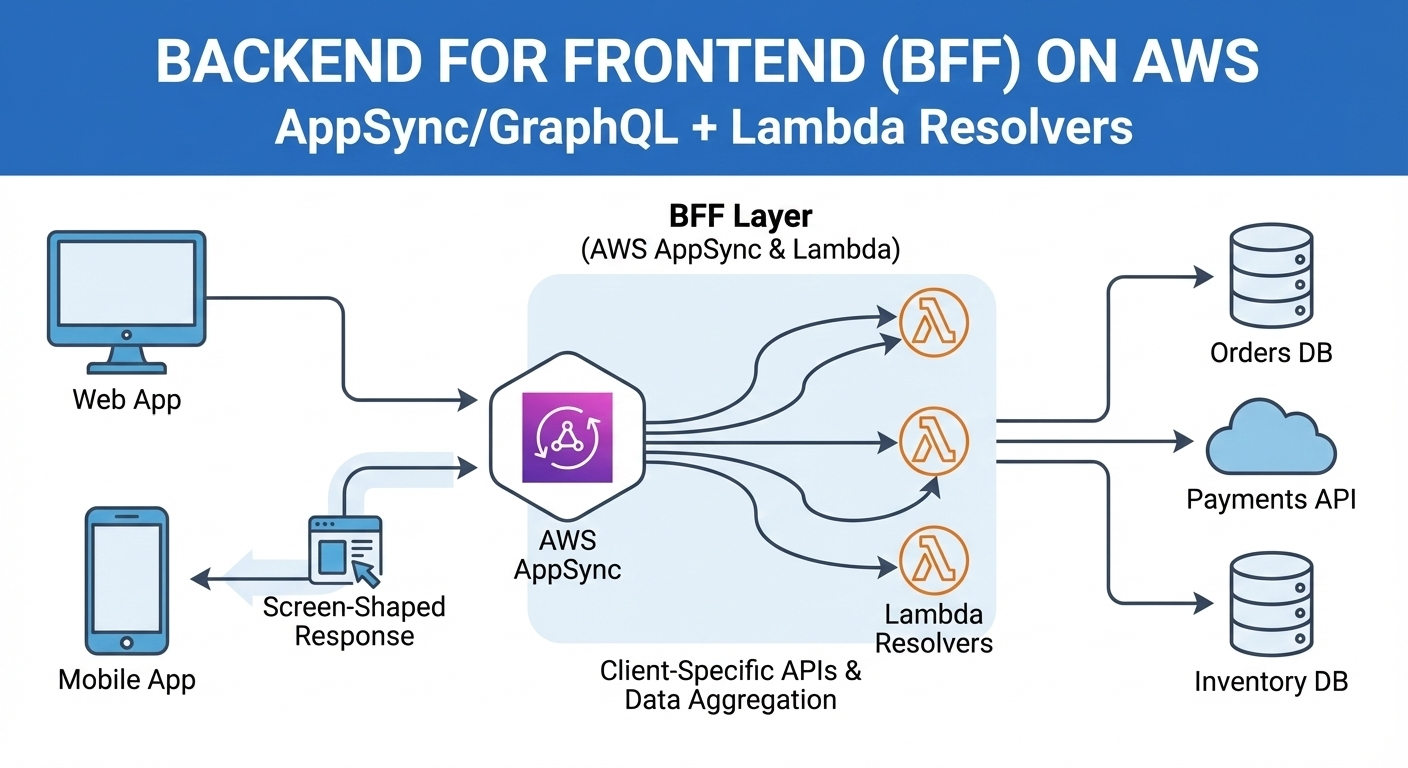
A BFF is a client-specific backend that aggregates and shapes data exactly the way that client needs, without exposing internal service complexity.
AWS ways to implement BFF (multiple options)
Option A (common): AppSync (GraphQL) as the BFF
Use AWS AppSync as the API layer; use Lambda resolvers to orchestrate/aggregate across services.
Good for:
- Many “screen-shaped” read models
- Product surfaces that change frequently
- Mobile apps that benefit from GraphQL’s selective fetching
Option B: Separate BFFs per client (AppSync per client or API Gateway per client)
You can run:
- One AppSync API per client type (web vs mobile), or
- API Gateway + Lambda per client type (REST-style BFF), or
- A hybrid: AppSync for reads, API Gateway for commands (writes)
Good for:
- Different auth models or SLAs per client
- Strong separation between web/mobile release cycles
Option C: Single AppSync API (one graph), “multiple views”
One schema, but resolvers and authorization rules enforce what each client can access.
Good for:
- Shared product surfaces
- Lower operational overhead than multiple BFF deployments
Variant patterns: how your BFF talks to backends
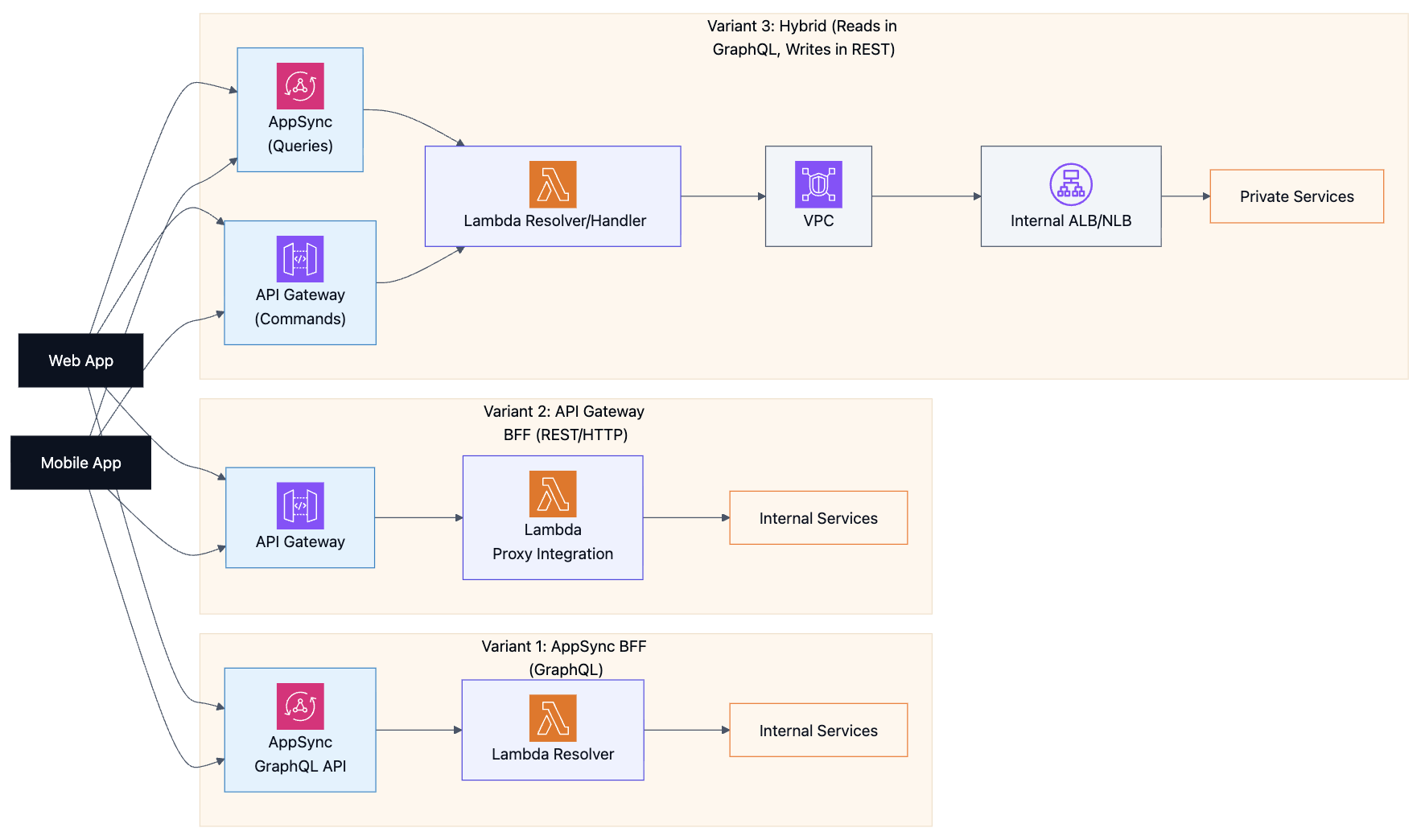
Variant 1: AppSync BFF → Lambda resolvers (no API Gateway)
AppSync can invoke Lambda resolvers directly. This is the cleanest GraphQL-first BFF setup.
Variant 2: API Gateway BFF → Lambda proxy integration
Here API Gateway is your BFF (REST/HTTP). It invokes Lambda via proxy integration and shapes responses per client.
Variant 3: Hybrid (common in production)
- AppSync for reads/aggregation (screen-shaped queries)
- API Gateway for commands/writes (mutations that cause side effects)
- AppSync resolvers (via Lambda) can also call private services behind internal ALB/NLB
Quick guidance (which variant to pick)
| Variant | Use it when | Watch out for |
|---|---|---|
| AppSync → Lambda | You want a GraphQL-first, screen-shaped API | Resolver fan-out (N+1), expensive queries |
| API Gateway → Lambda | You want REST/HTTP endpoints tailored per client | Multiple endpoints can drift; duplication across clients |
| Hybrid | You want GraphQL for reads + REST for writes | Two surfaces to secure/observe; keep boundaries clear |
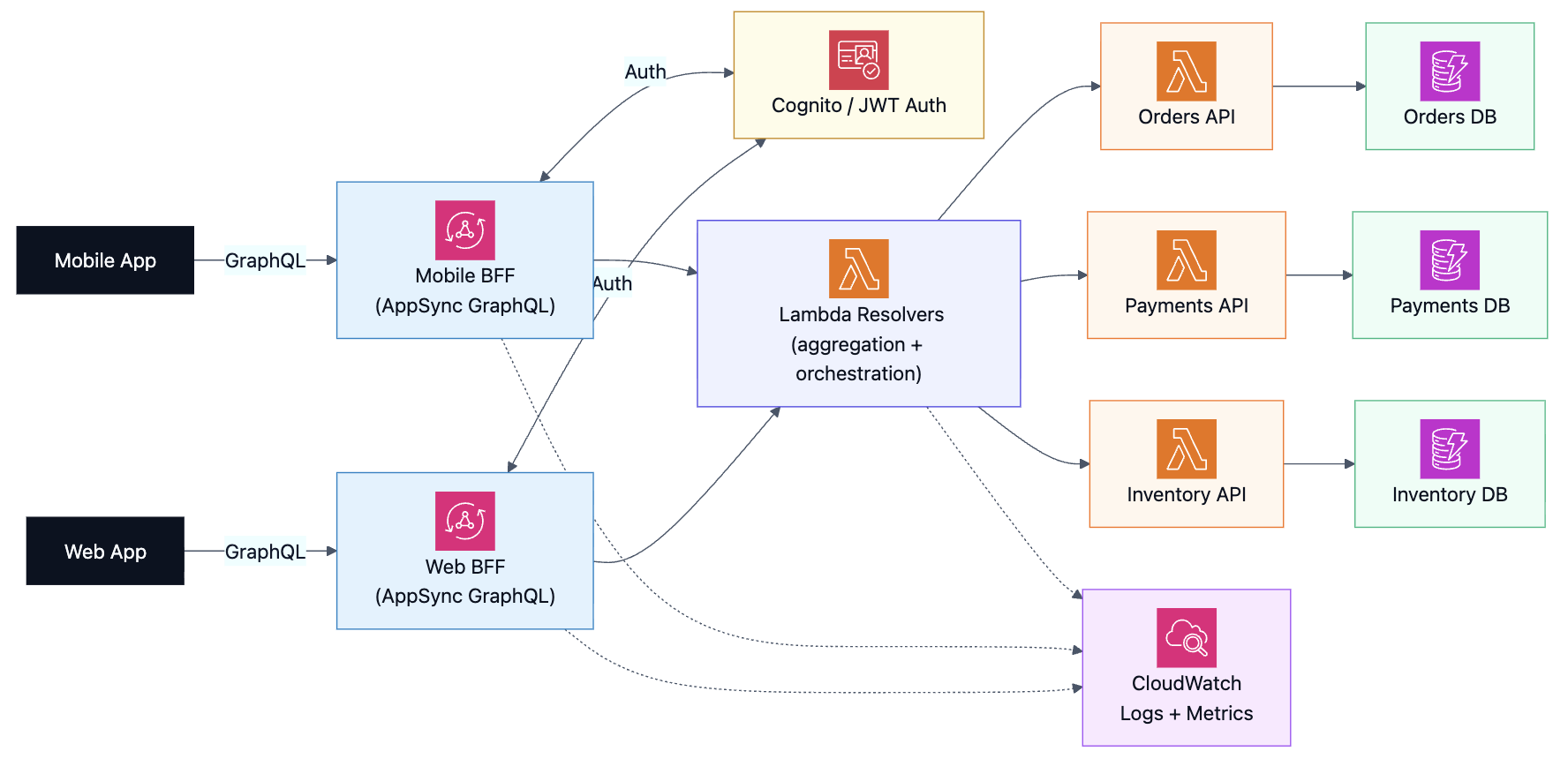
High-level architecture: BFF per client type with AppSync
How Lambda resolvers behave
A resolver is the “glue” that:
- Validates identity/claims (or relies on AppSync auth)
- Calls one or more internal services
- Aggregates results into a shape that matches the UI
- Applies fallbacks when a dependency is slow/unavailable (optional)
The frontends now issue a single GraphQL query instead of multiple REST calls.
Sequence diagram: one UI screen → one GraphQL call (emoji style)
%%{init: {"theme":"base","htmlLabels":true,"themeVariables":{
  "background":"#FFFFFF",
  "lineColor":"#475569",
  "textColor":"#0F172A",
  "actorBkg":"#EEF2FF",
  "actorBorder":"#4F46E5",
  "actorTextColor":"#0F172A",
  "actorLineColor":"#94A3B8",
  "signalColor":"#334155",
  "signalTextColor":"#0F172A",
  "labelBoxBkgColor":"#F8FAFC",
  "labelBoxBorderColor":"#CBD5E1",
  "labelTextColor":"#0F172A",
  "noteBkgColor":"#FFF7ED",
  "noteTextColor":"#0F172A",
  "activationBkgColor":"#ECFDF5",
  "activationBorderColor":"#10B981",
  "sequenceNumberColor":"#64748B"
}}}%%
sequenceDiagram
  autonumber
  participant U as 🧑 User
  participant C as 📱 Mobile App
  participant A as 🌐 AppSync (GraphQL)
  participant R as ⚙️ Lambda Resolver
  participant O as ⚙️ Orders Service
  participant P as ⚙️ Payments Service
  participant D as 🗄️ DynamoDB

  U->>C: Open "My Orders" screen
  C->>A: GraphQL query: myOrders { items { ... } totals { ... } }
  A->>R: Invoke resolver(s)
  par Fan-out aggregation
    R->>O: GetOrders(userId)
    O->>D: Query orders by userId
    D-->>O: orders
    O-->>R: orders
  and
    R->>P: GetPaymentStatus(orderIds)
    P-->>R: status map
  end
  R-->>A: Aggregated response (screen-shaped)
  A-->>C: GraphQL response
  C-->>U: Render UI
BFF design choices (the “real world” part)
One BFF per client vs one shared BFF
| Choice | Pros | Cons |
|---|---|---|
| BFF per client (web + mobile) | Perfect tailoring, independent releases, different SLAs | More deployments, more schemas/resolvers to manage |
| One shared BFF | Less ops overhead, shared schema | Risk of “generic backend” creeping back in; more coordination |
Where to put writes (commands)
Common approaches:
- Keep writes in REST endpoints (API Gateway + Lambda) and reads in AppSync
- Or do both reads/writes in GraphQL (mutations) if your team is comfortable with it
Performance: caching, batching, and avoiding the N+1 problem
Key idea: A BFF can accidentally create too many backend calls.
Good practices:
- Batch requests in resolvers (fetch many IDs at once)
- Use per-request caching within the resolver
- Consider a read-optimized store (like OpenSearch) for complex “feed” queries
Security and governance
- Use Cognito/JWT auth; enforce authorization at the field/resolver level
- Apply least-privilege IAM for resolver functions
- Add request limits and alarms (watch for abuse and expensive queries)
When BFF is a great fit (and when it’s overkill)
Great fit:
- Multiple clients with different UI needs
- Complex screens that require aggregation from many services
- Teams want to protect internal APIs from direct client access
Overkill:
- One client with simple CRUD
- Your backend already matches your UI needs well
Auto Amazon Links: No products found.